


SIQO Quick Start: How to Create Shared Wallets

Managing money with others — whether it’s splitting household expenses, pooling funds for a trip, or handling a team budget — shouldn’t mean compromising your personal account security. SIQO’s Shared Wallet feature lets you grant controlled access to specific funds without ever sharing your password or exposing your primary wallet.
What makes it powerful is the level of control you retain. When setting up a Shared Wallet, you define exactly how the funds can be used — setting credit limits, expiry dates, whitelisted addresses, and more. The person you share with gets access only to what you’ve explicitly allowed, nothing more.
Here’s how to set one up.
How to Set Up a Shared Wallet in SIQO
Creating a Shared Wallet allows you to grant controlled access to specific funds while maintaining overall security. Follow these steps to get started.
Step 1: Create New Wallet
Tap the wallet display area → tap “+”
Step 2: Choose “Shared Wallet”
This allows you to create a wallet governed by a Shared Wallet policy, complete with customizable access rules.
Step 3: Set Wallet Name & Tag
Provide a clear, descriptive name for the wallet (e.g., “Household Expenses”). Next, create a unique wallet tag. Note that this tag cannot be changed later, so choose carefully.
Step 4: Add Recipient
Search by username, nickname, or email.
Step 5: Select Assets & Amount
Choose crypto (e.g., USDT) and specify sharing amount.
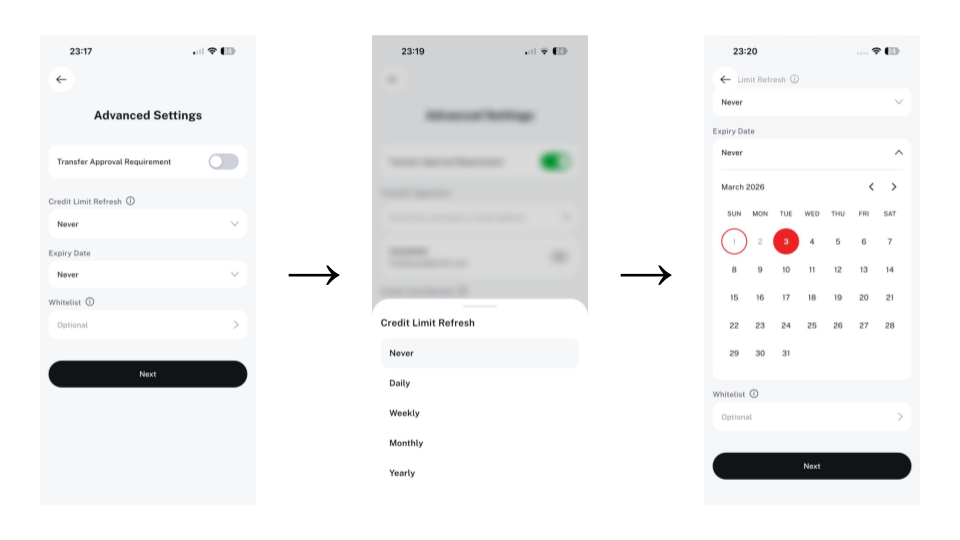
Step 6: Configure Advanced Rules (Optional)
You may set:
- Transfer approval requirement
- Credit limit refresh cycle
- Expiry date
- Whitelist restrictions
Step 7: Review & Confirm
Your shared wallet is ready.
By utilizing SIQO’s Shared Wallets, you eliminate the friction and security risks of traditional shared accounts, gaining the ability to collaborate financially with total transparency and control.